by Jim Rietz | Jun 3, 2018 | Tutorials
- Use the Add New Post tutorial to get stated
- Check Home Featured Slider category to be displayed on the home page.
- That's it!
The background for the slider is the Featured image. This needs to be sized to show correctly. Normally, the Featured image shows up to the left of the listing and is the centered square portion of the image. The Home Featured Slider will used a wide rectangle to display. It will take the vertical center portion of the image and may not be what you want. You may need to customize the photo to fit correctly.
by Jim Rietz | May 15, 2018 | Practice
Membership Form

by Jim Rietz | Apr 17, 2018 | Tutorials
- Select Post under the + New at the top of each page or hover over Posts on the left and select Add New
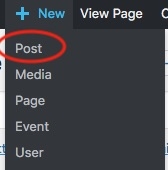
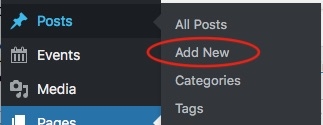 '
'
- Give the new Post a title.
- Select one or more Categories for the post to be displayed.
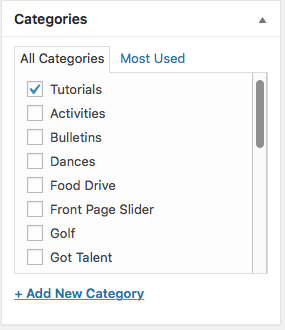
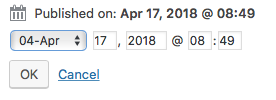
- If necessary, change the date for an historic event in the Publish section on the right. Click Edit after Published On... and set the date

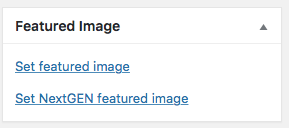
- Set a Featured Image. Most graphics (Bulletin, Newsletter, etc) are in Set featured image link, while others are in NextGEN. You can also add a new image after selecting Set featured image by clicking on Upload Files.
- Enter the body of your Post as necessary.
- Click Publish or Update
by Jim Rietz | Feb 28, 2018 | Tutorials
(more…)
by Jim Rietz | Feb 10, 2018 | Membership
 Our Sunshine Activity is chaired by Sharon Erven She is tasked with keeping the membership aware of illness that is occurring in the lives of our membership. If you know of a member who is sick, or needs our thoughts, prayers or well wishes, let Sharon know. She will take action to provide whatever is appropriate.
CONTACT: Sharon Erven 772-359-5806 sharonerven@gmail.com
WE ARE FAMILY!